Skool Payment Methods: What's Accepted, Why Cards Fail
Skool accepts credit and debit cards only. No PayPal, bank transfer or crypto. How to add or change a card, and why cards get declined.
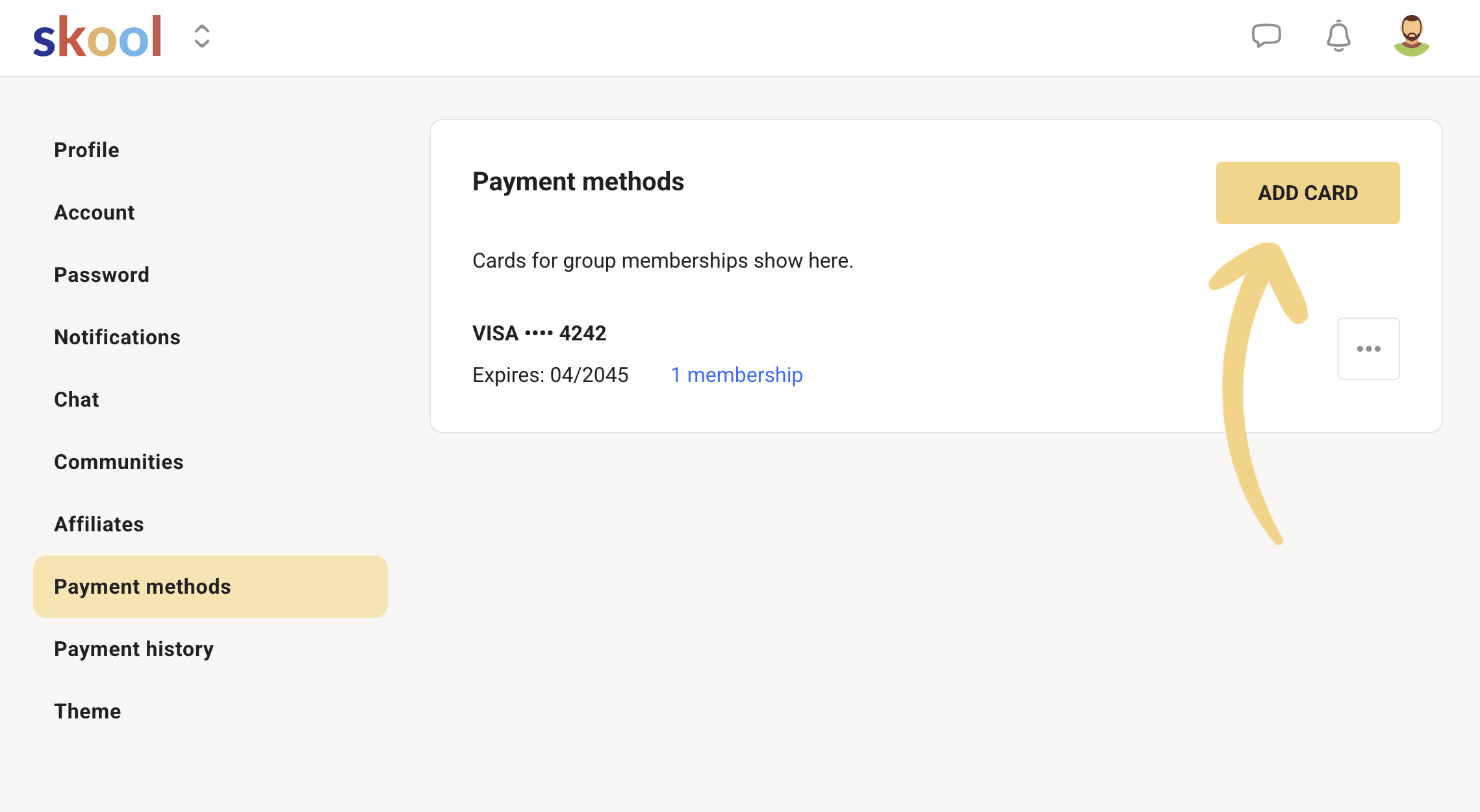
Skool accepts credit and debit cards, and nothing else. The member payment settings screen offers exactly one action, ADD CARD, and that is the whole list of payment methods. There is no PayPal, no bank transfer, no Apple Pay checkout, no crypto and no invoicing. Everything is charged in USD by Skool as the merchant of record. Here is how to add and change a card, and why a card that works everywhere else can still fail at a Skool checkout.
Skool payment methods in short
- Accepted: credit and debit cards
- Not accepted: PayPal, bank transfer, direct debit, crypto, manual invoicing
- Currency: all Skool prices are in USD, members pay in USD
- Per-charge limit: $100,000 USD
- Member path: profile picture, Settings, Payment methods, ADD CARD
- Owner path for your own Skool plan: SETTINGS, Billing, Update payment method
- Skool is the merchant of record, so it handles EU VAT
What payment methods does Skool accept?
Cards. Skool's own member help article walks through a single flow that ends at an ADD CARD button, with no alternative method offered anywhere on the screen. Once a card is stored you can add more cards, remove one, or transfer existing subscriptions across to a different card on file.
This is a deliberate architectural choice rather than a gap. Skool processes every payment on its own merchant account, which is what lets it collect and remit EU VAT on your behalf and pay you a single weekly settlement. Supporting a dozen payment rails would undo that. The cost of the simplicity is that a member without a working card cannot buy from you at all.
How to change your payment method on Skool
As a member paying for communities: click your profile picture in the top right, choose Settings, click Payment methods in the left navigation, then click ADD CARD. Once the new card is saved, use the three dots menu next to a card to remove it or to transfer your subscriptions onto a different card on file.
That transfer step is the one people miss. Adding a card does not automatically move your existing memberships onto it, so if you add a new card and delete the old one without transferring, a renewal can fail on a card that no longer exists.
As an owner paying for your own Skool plan, it is a different screen entirely: click SETTINGS inside your community, go to the Billing tab, and click Update payment method. That card is charged from the next billing cycle, and it only covers your Hobby or Pro subscription, not anything to do with what your members pay you.
Why Skool payments and free trials get declined
A declined Skool payment is almost always the card issuer refusing an international, recurring, USD charge from an unfamiliar merchant, not a Skool fault. That combination trips fraud rules on a lot of cards, particularly debit cards, prepaid cards and cards issued outside the United States.
The usual causes, in rough order of frequency: the issuing bank blocks the international or online transaction, the card is a prepaid or virtual card with insufficient balance for a recurring authorisation, 3D Secure verification is not completed, the billing address does not match, the card is a corporate card with online restrictions, or the card has simply expired.
Free trials add one more failure mode. A trial usually needs a small authorisation to validate the card, and cards with low or zero available balance fail that check even though the member is not being charged yet. This is why owners running paid ads into a free trial see a decline rate they did not expect: the offer attracts people whose cards are least likely to authorise.
If declines are eating your ad budget: the fix is usually upstream of the checkout, not at it. A free trial filters for people who will not commit money, and the card most likely to fail an authorisation belongs to exactly that person. Before removing the trial entirely, test raising the price or shortening the trial, because a straight switch to paid changes your conversion rate and your decline rate at the same time and you will not know which moved.
What to tell a member whose card fails
Ask them to try a different card first, because that resolves most cases immediately. If they only have one, the next step is to call their bank and authorise an international recurring charge, which usually clears it. Adding the card again after that authorisation is often necessary, since the first attempt may be locked.
A PayPal-issued debit card will work, because it is a card. Sending a PayPal balance will not. That distinction confuses a lot of members and is worth stating plainly in your own welcome copy. Full detail in does Skool accept PayPal.
Owners cannot fix a declined card from their side. There is no way to mark a member as paid, no manual invoice, and no off-platform workaround that keeps the membership legitimate. Taking payment outside Skool and granting access manually breaks the link between the subscription and the access, and you lose refund handling, VAT treatment and your own payout trail along with it.
Skool payment options vs other platforms
If accepted payment methods are a deciding factor for you, this is the honest comparison.
| Platform | Cards | PayPal | Other |
|---|---|---|---|
| Skool | Yes | No | None, USD only, $100k per-charge limit |
| Kajabi | Yes | Yes | Own Stripe or PayPal gateway |
| Patreon | Yes | Yes | Some regional methods |
| Circle | Yes | Varies by gateway | Your own Stripe |
| Whop | Yes | Yes | Crypto on some products |
| Teachable | Yes | Yes | Varies by plan and region |
Skool is the strictest of the group. If a meaningful share of your audience genuinely cannot or will not pay by card, that is a real reason to look elsewhere, and it is better discovered now than after you have moved a community across. For everyone else, the trade buys you weekly automatic payouts and no sales tax paperwork. See Skool vs Kajabi, Skool vs Patreon and Skool vs Whop.
What Skool charges to process a payment
Skool's processing fee comes out of what your member pays before it reaches your balance.
| Plan | Fee |
|---|---|
| Pro, transactions up to $899 | 2.9% + 30c |
| Pro, transactions above $900 | 3.9% + 30c |
| Hobby | 10% + 30c |
Transaction fees are non-refundable, including on refunded payments. The per-charge ceiling is $100,000 USD, which only matters if you sell a very high-ticket one-off. Full breakdown in how much Skool takes in fees, and the money on the way out is covered in Skool payouts.
Frequently asked questions
What payment methods does Skool accept?
Credit and debit cards only, charged in USD. Skool's member payment settings offer a single ADD CARD action with no alternative method. PayPal, bank transfer, direct debit, crypto and manual invoicing are all unsupported, and there is a $100,000 USD limit per individual charge.
How do I change my payment method on Skool?
Click your profile picture, go to Settings, click Payment methods, then ADD CARD. After the card is saved, use the three dots menu to remove an old card or to transfer your existing subscriptions to the new one. Transferring is a separate step from adding, so do both.
Why was my Skool payment declined?
Usually the issuing bank is blocking an international, recurring, USD charge from a merchant it does not recognise. Other common causes are prepaid or virtual cards with too little available balance, incomplete 3D Secure verification, a billing address mismatch, corporate card restrictions, or an expired card. Trying a second card resolves most cases, and calling the bank to authorise the charge resolves most of the rest.
Why do Skool free trials get declined so often?
A free trial still requires a card authorisation to validate the card, and cards with low or no available balance fail that check even though no money is taken. Communities driving paid traffic into a free trial see this most, because the offer is most attractive to the people whose cards are least likely to authorise.
Does Skool use Stripe?
Yes, behind the scenes. Members pay Skool by card, Skool acts as the merchant of record, and owners receive their earnings through Stripe Express, which is where payout details and bank accounts are managed. There is no general Stripe integration to configure: you cannot plug your own Stripe account into Skool or accept payments through it directly, and there is no way to run a Skool community without the built-in card processing.
Can a Skool community owner accept payment outside Skool?
Technically you can take money anywhere, but you should not tie community access to it. Off-platform payment severs the subscription from the membership, so you lose automated renewals, refund handling, VAT treatment and your payout record, and you take on the tax obligations Skool otherwise carries as merchant of record.
Does Skool charge members in their local currency?
No. All Skool prices are set and charged in USD, so members outside the US pay in USD and may see a foreign transaction fee from their own bank. Owners are paid out in their local currency, which is the opposite side of the same conversion.
Start your Skool community
Ready to build a community of your own? Start on Skool through our link. We may earn a commission if you create and keep a paid community, at no extra cost to you.
Start your Skool community →Keep reading
How to Cancel a Skool Subscription: Steps and Refunds

Skool Refund Policy: How to Get a Refund in 2026
Skool Growth Boost: How It Works and How to Win With It

How to Get Paid on Skool (Payments, Payouts, Refunds)

Skool Invite Link: 4 Ways to Invite Members (2026 Guide)

Skool Facebook Pixel & Ads Tracking Setup (2026 Guide)

Skool Chat Explained: DMs, Limits and Group Chat (2026)

Skool Webinar vs Skool Call: Which Should You Run?
