Skool Payouts: Schedule, Methods and First Payout Time
Skool pays out every Wednesday to your bank account in local currency. The first payout takes 8 to 14 days, then every 7 days. Methods and countries.
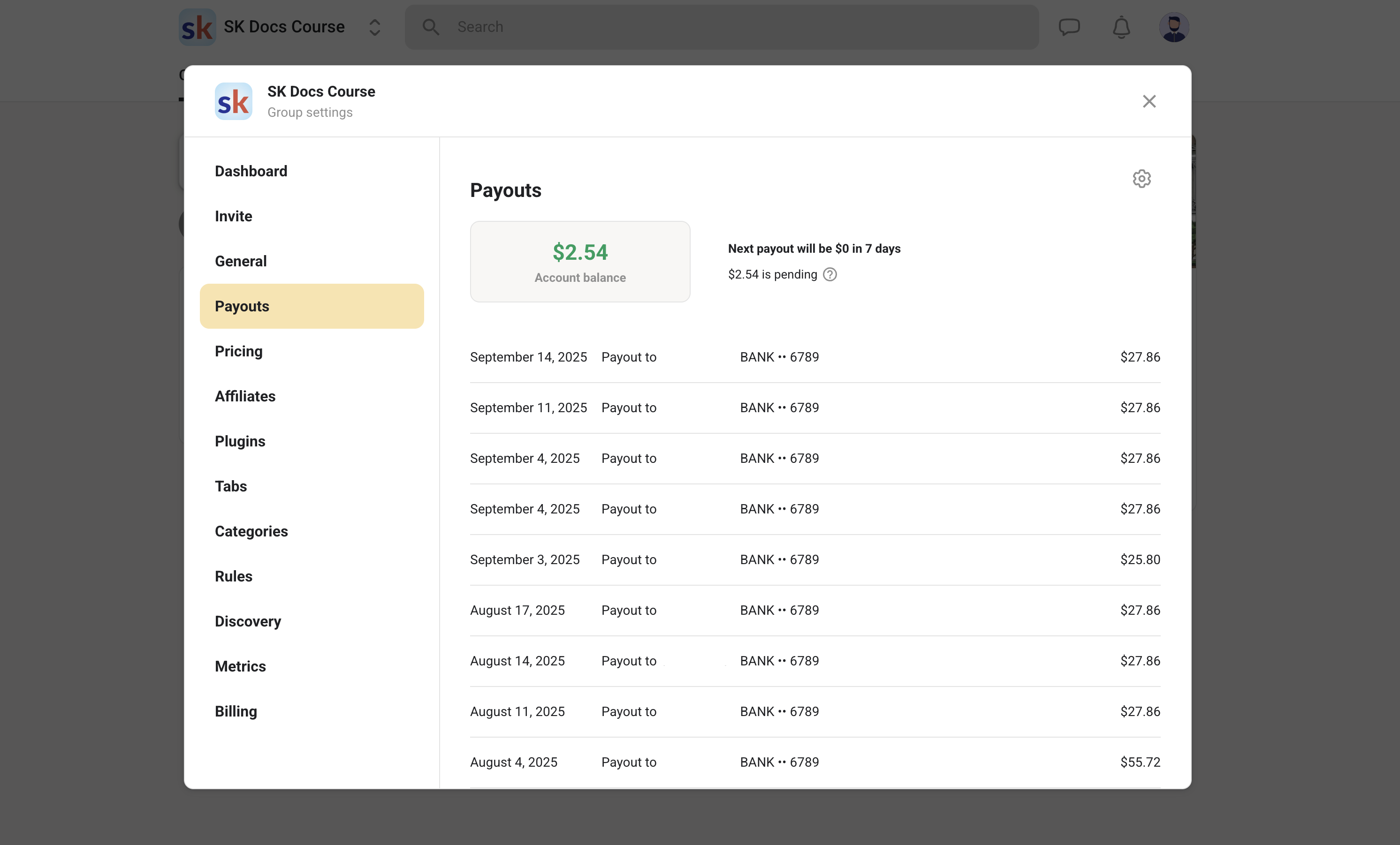
Skool pays out your available balance every Wednesday, automatically, to the bank account you connected, in your local currency. Your first payout is the slow one: funds take roughly 8 to 14 days to become available from your first payment, and after that it settles into a 7-day cycle. Everything else people search for around Skool payouts, the country list, the minimum amount, the delays, comes down to which of Skool's two payout systems you are on.
Skool payouts at a glance
- Schedule: every Wednesday, automatic, no request needed
- First payout: around 8 to 14 days from your first payment, then every 7 days
- Bank arrival: 2 to 3 business days US, 3 to 7 business days international
- Currency: your local currency, no USD deposits outside the US
- Countries: roughly 110 on the legacy system, plus 8 on the new local-bank system
- Minimum: typically one base unit of your local currency
- One bank account receives every group you own plus affiliate commissions
How Skool payouts work
Members pay Skool, not you. Skool is the merchant of record, so the money lands in your community balance rather than in a processor account you control. Every Wednesday Skool sweeps that available balance to your connected bank account automatically. You never request a payout and there is no withdraw button to press.
That design is why Skool handles EU VAT for you and why the fees are what they are. The trade is that you give up direct control of the payment rail in exchange for never touching sales tax filings. Skool issues a reverse invoice for each Wednesday payout, which you can view in settings.
How long does it take for Skool to pay out?
The first payout takes around 8 to 14 days from your first payment, because it runs through additional verification checks. From the second payout onwards it is every 7 days. Once the payout is initiated on Wednesday, most US bank accounts see the deposit in 2 to 3 business days, and international banks in 3 to 7 business days.
So a realistic worst case for a brand-new community is roughly three weeks between your first sale and cash in your account. This is the single most common source of panic among new Skool owners, and it is not a fault, it is the verification window. If you are past 14 days with nothing, that is when to check whether your identity verification actually completed.
One more requirement people miss: your group subscription has to be active for a payout to be initiated. If your own Skool plan lapses, your payouts stop.
The two payout systems, and which one you are on
Skool now runs two payout rails in parallel. Which one you use is decided by where your bank account is, not by anything you choose.
| Legacy payouts | New payout system | |
|---|---|---|
| How it connects | A Stripe Express sub-account Skool creates for you | Your local regional bank account, connected directly |
| Countries | Roughly 110, listed below | Colombia, India, Chile, Brazil, Mexico, Argentina, Peru, Costa Rica |
| Currency conversion | Handled on the Stripe rail | Local currency, stated as no additional conversion fee |
| Verification | Stripe individual or business documents | Mandatory KYC with a camera check by QR, SMS link or current device |
| Setup path | SETTINGS then Pricing then Add payout method | SETTINGS then Payouts then Add payout method |
The new system arrived with Skool News #70 and is the reason India and Brazil went from unsupported to supported. Skool's help centre says more regions are added every week, so a country missing today is not necessarily missing next month.
An important caveat: this is not a normal Stripe account. You cannot connect an existing Stripe account, all payment processing happens on Skool's merchant account, and Skool always creates a new Stripe Express sub-account when it builds the connection. Skool also does not support Wise, Chime or similar fintech accounts as the destination.
Skool payout countries
Skool's legacy payout system supports roughly 110 countries, including the United States, United Kingdom, Canada, Australia, New Zealand, most of the European Union, Japan, Singapore, Hong Kong, South Korea, Taiwan, the UAE, Saudi Arabia, South Africa, Nigeria, Kenya, Pakistan, Bangladesh, Indonesia, Malaysia, Philippines, Thailand, Vietnam, Sri Lanka, Turkey, Mexico, Colombia, Chile, Peru, Argentina, Uruguay, Paraguay, Bolivia, Ecuador, Costa Rica, Panama, Guatemala, El Salvador, Dominican Republic and Jamaica.
India and Brazil are supported through the new local-bank payout system rather than the legacy list. The full authoritative list lives in Skool's payments FAQ and changes, so check it before making a decision based on residency.
Skool recommends selecting the country where you actually reside, bank and are registered as a business, because verification documents are checked against that choice. Picking a country you have no genuine connection to is where most stuck verifications come from.
The minimum payout amount
Skool's minimum payout is typically one base unit of your local currency, which is set by what its banking partners can support. If your available balance is below that minimum, the money stays in your community balance until it grows past the threshold.
In practice this only affects very small or very new communities, and the balance is never lost, only held. It is worth knowing simply so a first Wednesday with no deposit does not look like a bug.
What comes out before you get paid
Payouts are net of Skool's transaction fees, which depend on your plan.
| Plan | Fee per transaction | On a $50 membership |
|---|---|---|
| Pro, up to $899 | 2.9% + 30c | roughly $48.25 |
| Pro, above $900 | 3.9% + 30c | n/a at this price |
| Hobby | 10% + 30c | roughly $44.70 |
If Growth Boost brought you the member, Skool also deducts a 30% commission on that member's recurring charges for as long as the subscription stays active. Transaction fees are non-refundable, including when you refund a member. The full arithmetic is in how much Skool takes in fees and the plan comparison is in Hobby vs Pro.
Affiliate payouts use the same account
Skool affiliate commissions pay into the same bank account as your community payouts. There is no separate affiliate payout method to configure, which is why the setup screen asks you to add a bank account to your Skool account rather than to a specific group.
If you own several communities, all of them plus your affiliate earnings settle into that one account. Details of the programme itself are in the Skool affiliate program explained.
Skool payouts vs the alternatives
Payout mechanics are one of the least compared parts of choosing a platform, and one of the most annoying to discover late.
| Platform | Payout timing | Who is merchant of record |
|---|---|---|
| Skool | Weekly, every Wednesday, automatic | Skool, which also handles EU VAT |
| Kajabi | Via your own Stripe or PayPal, on their schedule | You |
| Patreon | Monthly payout cycle, withdrawal-based | Patreon on some plans |
| Circle | Via your own Stripe connection | You |
| Whop | Frequent payouts, platform-controlled | Whop |
| Teachable | Monthly or on a gateway schedule depending on setup | Varies by plan |
The structural difference is that Skool takes the merchant-of-record burden and pays you on a fixed weekly clock, while Circle and Kajabi hand you your own Stripe account and, with it, your own tax obligations. Neither is universally better. Weekly automatic settlement is better cashflow; your own gateway is better control.
Fixing a payout that has not arrived
Work through it in this order. Check that more than 14 days have passed since your first payment, because before that the money is simply not available yet. Check that your identity verification finished rather than stalling at a document upload. Check that your own Skool subscription is active, since an inactive group subscription stops payouts. Check that the balance is above the minimum. Then check the payout tab in settings for the actual status rather than assuming.
If all of that is clean and the money still has not moved, contact Skool through the support flow rather than searching for a phone number, because there is not one. See how to contact Skool support.
Do the payout setup before you need it: connect the bank account and finish verification on day one, while your balance is zero and nothing is at stake. The 8 to 14 day first-payout window runs from your first payment, not from when you finally complete KYC, so an unverified account turns a two-week wait into a month-long one.
Frequently asked questions
How long does it take for Skool to payout?
Your first payout takes around 8 to 14 days from your first payment because of extra verification checks, then payouts run every 7 days. After Wednesday's payout is initiated, deposits reach most US bank accounts in 2 to 3 business days and international accounts in 3 to 7 business days.
How do I get paid from Skool?
Connect a bank account under SETTINGS, either through Pricing then Add payout method on the legacy system or Payouts then Add payout method on the new one, complete identity verification, and set a price on your group or a course. From then on Skool pays your available balance automatically every Wednesday in your local currency. There is nothing to request. The step-by-step setup is in how to get paid on Skool.
Is Skool available in India?
Yes. India is supported through Skool's new payout system, which connects a local INR bank account and settles in local currency with no additional currency conversion fee. India was not on the legacy Stripe Express country list, so this only became possible with the new rail announced in Skool News #70.
What is the minimum Skool payout amount?
Typically one base unit of your local currency, set by what Skool's banking partners support. If your balance is below the minimum it stays in your community balance and rolls forward until it clears the threshold.
Can I use my own Stripe account for Skool payouts?
No. Skool always creates a new Stripe Express sub-account when it sets up the connection, and all payment processing happens on Skool's own merchant account. The Stripe Express connection exists only to move money to your bank. Skool also does not support Wise, Chime or similar fintech platforms as the receiving account.
Do all my communities pay into the same bank account?
Yes. One bank account is attached to your Skool account, and every group you own plus your affiliate commissions settle into it. You cannot route different communities to different banks.
Does Skool pay out in USD?
Only inside the United States. All Skool subscription prices are set and charged in USD, but payouts convert to your local currency, and Skool does not support USD deposits outside the US. A UK owner is paid in GBP, an Indian owner in INR.
Start your Skool community
Ready to build a community of your own? Start on Skool through our link. We may earn a commission if you create and keep a paid community, at no extra cost to you.
Start your Skool community →Keep reading
Skool Affiliate Program (2026): 40% Recurring Commissions

Luxxxe Unlimited Review: Miranda Perry's $17 Community

Close Like Cronin Review: Jeff Cronin's $99 Sales System

6 Figure Insta Club Review: Michelle Gifford's $97 Skool

Raise The Roofer: Jay Bradley's Roofing Sales Skool Review

Poop Scoop Millionaire: William Milliken's Skool Review

Teachers Who Sell: Stephanie Nash's $9 Skool Review

How to Start a Skool Community and Make Money (2026 Guide)
Skool VAT Invoice: How Skool Tax Really Works (2026)
