How to Delete a Skool Account (There Is No Button)
There is no button to delete a Skool account. What Account settings really offers, cancel vs leave vs delete group, and the only route that works.
There is no button to delete a Skool account. Checked directly on the live Account settings page, the tab offers exactly five things: change email, change password, set language, set timezone, and log out of all devices. No delete, no deactivate, no close account. Deleting a Skool account is a support request, not a self-serve action, and almost everyone searching for it actually wants one of three other things instead. Here is how to tell which one you need.
Skool account deletion at a glance
- Self-serve delete: not available
- Account settings offers: email, password, language, timezone, log out everywhere
- Stop being billed: cancel the membership, not the account
- Delete a group: possible, but only after it archives
- Merge two accounts: not possible
- Leave a free group: instant, no support needed
- Erasure request: via Skool support
- Accounts are: unique and standalone
Can you delete a Skool account?
Not from inside the product. Skool's Account settings page contains no deletion or deactivation control, and the help centre has no article covering account deletion, while it does have dedicated articles for cancelling a membership, cancelling a Skool subscription and deleting a group. Removing an account entirely is handled as a support request.
That absence is the honest answer, and it is worth saying plainly, because the shape of the search suggests most people arrive expecting to find a button.
What you probably actually want instead
Six different problems get typed into the same search box. Find yours before you email anyone.
| What you want | What to actually do |
|---|---|
| Stop being charged by a community | Cancel that membership; the account stays |
| Stop paying Skool for your own group | Cancel the group subscription in Billing |
| Leave a community quietly | Leave the group; free groups are instant |
| Get rid of a duplicate account | Rejoin groups on your preferred account |
| Remove your group entirely | Cancel, wait for archive, then delete group |
| Erase your personal data | Contact Skool support directly |
Cancelling a paid membership is the right move for most people, and it does not delete anything. The step-by-step is in how to cancel a Skool subscription, and if money has already been taken, read the Skool refund policy first, because cancelling never triggers an automatic refund.
How do you delete a Skool group?
Deleting a group is possible, unlike deleting an account, but it has two prerequisites: you must be the only person left in the group, and the group must already be archived. A group archives at the end of its billing cycle after you cancel.
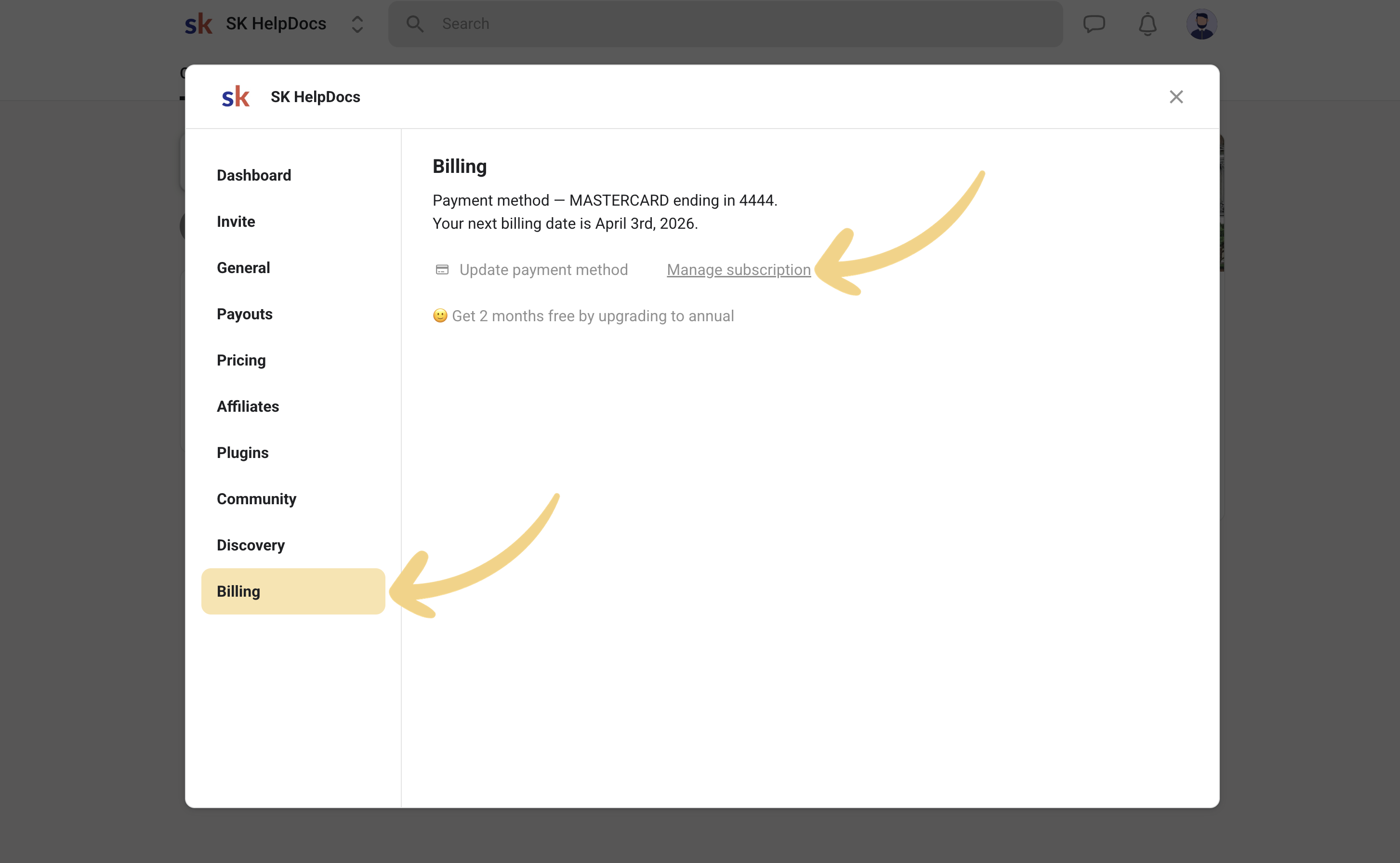
- Go to your group Settings, then Billing, then Manage subscription, and cancel.
- Wait for the billing cycle to end. The group archives automatically.
- Remove or wait out every other member, so that you are the only person left.
- Return to Settings, then Billing, then Delete group.
Skool's own guidance is that in most cases you only want to cancel the subscription to stop the billing, and that deleting the group is not a required step. Deletion is irreversible, so unless you have a specific reason to erase the content, leaving the group archived is the safer choice.
What about duplicate Skool accounts?
Skool accounts cannot be merged. Every account is unique and standalone. If you have accidentally created two, Skool's guidance is to pick the one you want to keep and rejoin your groups with it, rather than trying to delete the other.
For a paid group, cancel on the old account and join on the new one. You may need to message the group admin to explain that you are requesting access under a different account, particularly in an approval-gated community. Note that the second account will keep existing whether you use it or not, which is one more reason people go looking for a delete button.
How to delete a Skool account on iPhone or Android
The same answer applies. The Skool mobile app mirrors the web Account settings, so it has no delete control either. Cancelling a membership bought through the app follows the app store's own subscription flow rather than Skool's, so check both places if billing continues after you think you have cancelled.
What is the only route that actually deletes an account?
If you genuinely need the account and its data removed rather than just the billing stopped, do these in order.
- Cancel every paid membership so nothing charges you mid-process.
- Leave every group you are a member of.
- Cancel and archive any group you own, then delete it if you want the content gone.
- Contact Skool support and request account deletion, stating the email address on the account.
Doing steps one to three first matters, because an open subscription or an owned group is the usual reason a deletion request stalls. Skool does not publish a support phone number or a general support email address, so the documented route is the in-product support flow, covered in how to contact Skool support.
Before you delete anything: the thing that actually costs money is the subscription, and the thing that actually protects your privacy is leaving groups. A dormant Skool account with no memberships and no owned group bills you nothing and exposes nothing beyond your profile. If your real goal is "stop paying" or "stop appearing in that community", cancelling and leaving gets you there today, with no support ticket and nothing irreversible. Reach for deletion only when data erasure is the actual requirement.
Frequently asked questions
How do I permanently delete my Skool account?
There is no self-serve option. Cancel all paid memberships, leave every group, cancel and delete any group you own, then contact Skool support with the account email to request deletion.
Is there a delete account button in Skool settings?
No. The Account tab offers change email, change password, language, timezone and log out of all devices. Nothing else. This was checked on the live settings page in September 2026.
How do I delete my Skool community?
Cancel the group subscription in Settings, Billing, Manage subscription. Wait for the group to archive at the end of the billing cycle, ensure you are the only member left, then use Settings, Billing, Delete group.
Can I merge two Skool accounts?
No. Skool accounts are unique and standalone with no merge function. Choose one account and rejoin your groups with it, cancelling paid memberships on the account you are abandoning.
Does deleting my account cancel my subscriptions?
Do not rely on it. Cancel every paid membership and any group subscription first, or you risk being billed while a deletion request is in progress.
Will leaving a Skool group remove my posts?
Leaving removes your access. It does not guarantee removal of content you posted. If content removal is the goal, ask the group admins before you leave, since you lose the ability to message inside the group once you are out.
Updated September 2026. The absence of a delete control was verified first-hand on the live Skool Account settings page on 1 September 2026. Group deletion, multiple-account and cancellation mechanics are taken from Skool's help centre. Product behaviour changes; recheck your settings page before assuming.
Start your Skool community
Ready to build a community of your own? Start on Skool through our link. We may earn a commission if you create and keep a paid community, at no extra cost to you.
Start your Skool community →Keep reading

Skool Webinar vs Skool Call: Which Should You Run?

Skool Invite Link: 4 Ways to Invite Members (2026 Guide)

Skool Facebook Pixel & Ads Tracking Setup (2026 Guide)

Skool AutoMod: How to Stop Spam in Your Community (2026)
Skool Analytics Explained: Every Metric in the Dashboard

Skool Membership Tiers: Run Multiple Paid Plans (2026)
Is Skool Free? What Costs Nothing and What Doesn't (2026)

How Much Do Online Fitness Coaches Make? 50 Real Rooms

Skool Chat Explained: DMs, Limits and Group Chat (2026)
